

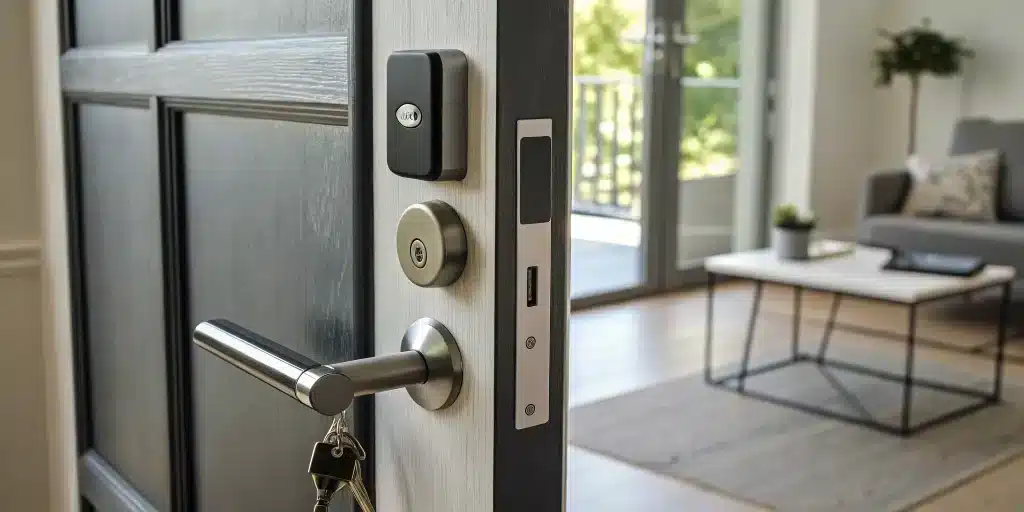
Moving from a traditional key to a smart lock is a major step up for your home’s security. If you are still deciding whether the upgrade makes sense, start with our guide to upgrading an NYC property with smart locks. It’s about more than just the convenience of not carrying keys; it’s about gaining complete control over who can access your property. Features like digital encryption, tamper alerts, and detailed activity logs give you unprecedented peace of mind. However, all of these advanced security benefits depend entirely on a correct smart lock installation. A poorly installed lock can be a vulnerability. In this guide, we’ll walk you through the essential security features to look for and explain how to ensure your new lock is installed for maximum protection, from the physical hardware to the digital setup.
Before you begin the installation process, ensure your hardware is compatible with your door type. If you haven’t purchased a lock yet, see our top recommendations for the best renter-friendly smart locks for apartments.
Key Takeaways
- Look for Essential Security Features First: While keyless entry is convenient, ensure your smart lock has non-negotiable security features like strong digital encryption, tamper alerts, and a physical backup key so you’re never left vulnerable or locked out.
- Ensure a Perfect Fit Before You Install: A successful installation starts with preparation. Check your door’s alignment and thickness, and take accurate measurements to confirm compatibility, which prevents performance issues and ensures the lock functions smoothly.
- Actively Use Your Lock’s Smart Capabilities: Get the most out of your investment by using features like temporary access codes for guests and monitoring the activity log. Simple upkeep, like changing batteries and updating software, is also crucial for long-term reliability.
What Exactly Is a Smart Lock?
Think of a smart lock as the next evolution of your front door’s security. Instead of relying solely on a traditional metal key, a smart lock gives you keyless entry options using a keypad, your fingerprint, or an app on your smartphone. The main idea is to add a layer of convenience and control to your life. You can grant access to guests remotely, check if you remembered to lock the door from your office, and stop worrying about lost or stolen keys. This makes them a fantastic upgrade for both residential and commercial properties, blending modern technology with the fundamental need for security.
How Do They Work?
At its core, a smart lock is an electromechanical lock that communicates with an authorized device to lock and unlock. This communication usually happens via Bluetooth or Wi-Fi. When you tap a button in your smartphone app or enter a code on the keypad, the lock receives a secure command to operate its internal motor. Many smart locks are designed for a straightforward DIY installation, often requiring just a screwdriver. They replace your existing deadbolt while fitting into the same holes, so you don’t have to alter your door. The lock then pairs with your phone, walking you through the setup process to create access codes and customize your settings.
Exploring the Different Types
Smart locks aren’t one-size-fits-all; they come in several varieties to suit different needs and budgets, typically ranging from $100 to $450. Keypad locks are a popular choice, allowing entry with a simple numeric code. Biometric locks use your fingerprint for instant access, offering top-tier security. Bluetooth-enabled locks connect directly to your phone when you’re nearby, while Wi-Fi models connect to your home network, letting you control the lock from anywhere in the world. Others use Z-Wave or Zigbee to integrate with a broader smart home system, allowing your lock to communicate with other devices like lights and security cameras.
A Look at Popular Brands
When you start shopping, you’ll see a few names pop up repeatedly. Brands like August are known for their discreet design that fits over your existing deadbolt, letting you keep your original keys. Yale, a long-trusted name in locks, offers a wide range of durable and reliable smart locks with various features. Newer brands like Wyze have gained popularity for offering affordable yet effective options. Others, such as SimpliSafe, integrate their smart locks seamlessly into a complete home security ecosystem. No matter which brand you choose, the technology is designed to make your home more secure and accessible.
How Much Does Smart Lock Installation Cost?
Upgrading to a smart lock is an exciting step for your home security, but it’s natural to wonder about the price tag. The total cost isn’t just about the lock itself; it also includes potential installation fees and a few other factors. Let’s break down the numbers so you can budget accordingly and make a choice that feels right for you and your home. Understanding the full picture helps you see this as an investment in both convenience and security. From the hardware to the setup, here’s what you can expect to spend.
The Price of the Lock Itself
First up is the cost of the smart lock. You’ll find that prices vary quite a bit, generally falling somewhere between $100 and $450. This wide range comes down to features and brand reputation. A more basic model might offer simple Bluetooth-enabled keypad entry. On the higher end, you’ll find locks with fingerprint scanners, built-in Wi-Fi for remote access from anywhere, and integrations with smart home systems like Alexa or Google Assistant. Think about which features are must-haves for your lifestyle to find a lock that fits your needs and your budget.
Factoring in Professional Installation
While some people enjoy a good DIY project, hiring a professional ensures your lock is installed correctly and securely from the start. Professional installation typically costs between $200 and $350. This fee usually covers the entire setup, including connecting the lock to your Wi-Fi and installing any accessories. Opting for a pro is a great way to get peace of mind, especially if you’re not comfortable with tools or if your door requires slight modifications. A correctly installed lock is a secure lock, making professional help a worthwhile part of your investment in modern security systems.
Budgeting for Extra Tools and Hardware
If you decide to install the lock yourself, the good news is you probably won’t need to buy many special tools. Most smart lock installations require basic household items like a Phillips head screwdriver, a level, and maybe a drill. Before you start, check the installation guide to see exactly what’s needed and take a look in your toolbox. The main time you might run into extra costs is if your door isn’t compatible and needs adjustments. If you find that your door frame or deadbolt hole needs work, it might be time to call in for professional door repair and installation.
Considering Long-Term Maintenance
The initial purchase and installation aren’t the only costs to think about. Smart locks run on batteries, which you’ll need to replace periodically to keep the lock functioning. The battery life varies by model and usage, but it’s a small, recurring expense to keep in mind. It’s also important to have a stable Wi-Fi connection, as connectivity issues can affect the lock’s remote features. And what about a power outage? Most smart locks have a backup, like a physical key or an external battery terminal, so you won’t get locked out.
Must-Have Security Features
When you’re ready to upgrade to a smart lock, it’s easy to get caught up in the cool tech features. But at the end of the day, a lock’s main job is to keep your home or business secure. Not all smart locks are built the same, so it’s important to look for specific features that offer real protection, not just convenience. Think of these as the non-negotiables for your front door’s security. From encryption that guards against digital threats to practical functions like auto-locking, these are the features that truly make a smart lock a smart choice for your peace of mind.
Digital Encryption and Secure Access
The biggest leap from a traditional lock to a smart one is how you get inside. Instead of a physical key that can be lost or copied, smart locks use digital “keys” like a keypad code, your fingerprint, or an app on your phone. This offers incredible convenience, but it also needs to be secure. Look for locks that use strong encryption, like AES 128-bit or higher. This is the same level of security used by banks, and it protects your lock from being hacked. A secure access control system ensures that only you and the people you trust can open your door, giving you a modern way to manage entry without sacrificing safety.
Alerts for Tampering
One of the best things about a smart lock is its ability to communicate with you. A crucial feature to look for is tamper alerts. If someone tries to break the lock, force it open, or even just enters the wrong code too many times, the lock can send an instant notification straight to your smartphone. This real-time alert lets you know about a potential security issue the moment it happens, whether you’re at work or on vacation. Many smart locks also keep a detailed activity log, so you can see exactly when the door was locked or unlocked and by whom. This feature gives you a clear picture of who is coming and going from your property.
The Auto-Lock Function
Have you ever left home and spent the rest of the day wondering if you remembered to lock the door? The auto-lock feature is for you. You can program your smart lock to automatically secure itself after it’s been closed for a set amount of time, like 30 seconds or five minutes. It’s a simple but incredibly effective way to make sure your home is never left vulnerable by accident. Many models also let you check the lock’s status and lock it remotely from your phone. This is a must-have for any busy household or commercial property where you need to be certain the premises are secure after hours.
Backup Ways to Get In
While smart locks are reliable, technology can sometimes fail. What happens if the batteries die, your Wi-Fi goes out, or you lose your phone? A good smart lock will always have a backup plan. Most high-quality models include a traditional keyhole as a physical override, so you can still get in with a standard key. Some have terminals on the exterior that let you temporarily power the lock with a 9-volt battery if the internal one dies. Before you buy, always make sure there’s a reliable, non-digital way to get inside. If you ever find yourself stuck, our emergency locksmiths are available 24/7 to help.
Your Pre-Installation Checklist
Getting ready to install a new smart lock is exciting, but a little prep work goes a long way in making sure everything goes smoothly. Before you start unscrewing anything, it’s smart to run through a quick checklist. This ensures your new lock will fit perfectly and that you have everything you need on hand, saving you from a last-minute trip to the hardware store or a call for help. Think of it as setting the stage for a successful and stress-free installation.
Check Your Door’s Compatibility
First things first, let’s make sure your door and your new smart lock are a good match. Most smart locks are designed to replace a standard single-cylinder deadbolt, but it’s always best to confirm. Check your door’s thickness and material—wood, metal, or fiberglass doors all work, but the installation steps might vary slightly. Also, make sure your door is properly aligned. If you have to push or pull it to get the current lock to engage, you may need a door repair before installing a smart lock, as the motorized deadbolt needs a clear path. Finally, consider if you want the lock to integrate with any existing smart home or security systems you already use.
Gather Your Tools and Materials
The good news is you likely won’t need a specialized toolkit for this project. Most smart lock installations only require a few basic household items. The most important tool will be a Phillips head screwdriver. You’ll also want a tape measure handy for the next step and a level to make sure everything is installed straight. Depending on your door and the specific lock model, you might need a drill, but that’s not always the case. Your new smart lock should come with all the necessary screws and hardware, so just unbox it carefully and lay everything out before you begin.
Measure Your Door Correctly
Accurate measurements are key to a seamless fit, especially in older buildings or homes with custom doors. You’ll need to measure the backset, which is the distance from the edge of the door to the center of the lock hole. Standard backsets are either 2 ⅜ inches or 2 ¾ inches. You should also measure the diameter of the hole where the lock sits (the cross bore) and the thickness of the door itself. Taking a few moments to get these measurements right can save you a major headache. If your door has decorative trim, double-check that the new lock’s faceplate won’t interfere with it.
How to Remove Your Old Lock
With your prep work done, it’s time to take off the old lock. Start on the inside of the door by unscrewing the housing that contains the thumbturn. Once that’s off, you should see two long screws that go through the door to the exterior lock component—remove those next. The interior and exterior pieces should now come right off. Finally, remove the two small screws on the edge of the door that hold the deadbolt latch in place, and slide the latch out. It’s a straightforward process, but if you run into any trouble or feel unsure, our residential locksmith team is always ready to help.
A Step-by-Step Guide to Installation
Ready to install your new smart lock? It’s a totally manageable project for most people, but it’s important to get it right for your security and peace of mind. This guide will walk you through the essential steps, from attaching the hardware to programming your first keyless code. Think of it as your roadmap to a smarter, more secure front door.
Before you begin, remember that every door is a little different. You might run into a snag, like a misaligned door frame or a stubborn old lock that just won’t budge. If you find yourself stuck or just aren’t comfortable with the process, don’t hesitate to call for help. A professional can handle the installation quickly and ensure everything is working perfectly. Our team offers emergency locksmith services 24/7 across NYC, so we’re always here if you need a hand.
Step 1: Install the Mounting Plate
First things first, you’ll need to remove your old deadbolt. Once it’s out, your first task is to install the new mounting plate that came with your smart lock. This piece is the foundation of your new setup, and it’s crucial for making sure the lock is stable and secure. Some models also come with an adapter to ensure a snug fit on your specific door. Take your time with this step—a secure mounting plate prevents wiggling and ensures the deadbolt aligns correctly. If your door shows signs of damage around the old lock, it might be a good time to consider a door repair to create a solid base.
Step 2: Connect the Lock Hardware
With the mounting plate firmly in place, you can now attach the main smart lock hardware. This usually involves securing the exterior keypad and the interior assembly, then connecting them with a small cable that runs through the door. Make sure the deadbolt can extend and retract smoothly without catching on anything. If you feel any resistance, double-check the alignment. A perfectly aligned lock not only works better but also helps conserve battery life, since the motor won’t have to work as hard to move the bolt. This is a common step where a small adjustment can make a big difference.
Step 3: Set Up the App
Now it’s time to bring your lock into the digital world. Download the manufacturer’s app on your smartphone and follow the prompts to create an account. The app will guide you through adding your new lock, which typically involves scanning a QR code or pressing a button on the lock itself. You’ll connect it to your home’s Wi-Fi network, give it a name (like “Front Door”), and configure any integrations with your other smart home devices. This app is your new command center, allowing you to manage your home’s security from anywhere and integrate it with broader security systems.
Step 4: Test Everything Out
Don’t close up your toolbox just yet! Before you call it a day, it’s essential to test every function of your new smart lock. Manually lock and unlock it from the inside. Then, use the app to do the same. Test the keypad, the auto-lock feature, and any other functions your model offers. Pay close attention to how the deadbolt moves. If it seems to struggle or make grinding noises, your door might not be perfectly level, which can strain the lock’s motor over time. This is a common issue in older buildings and something a professional can easily adjust.
Step 5: Program Your Access Codes
The final step is setting up your keyless entry codes. This is where the convenience of a smart lock really shines. Through the app, you can create a primary code for yourself and unique, temporary codes for guests, dog walkers, or contractors. This feature gives you complete control over who can enter your home and when, without ever needing to hand out a physical key. It’s an ideal solution for both residential homes and businesses that need to manage access for multiple employees or clients. Once your codes are programmed, you’re all set to enjoy your new key-free life.
Using Your Smart Lock’s Best Features
Once your smart lock is installed, the real fun begins. These devices are packed with features designed to make your life easier and your home more secure. Getting to know these functions will help you make the most of your investment. From ditching your keys for good to letting in the dog walker from your office, here’s how to use your smart lock’s best features to streamline your daily routine and add a layer of convenience you’ll wonder how you ever lived without. It’s a core part of modern security systems that puts you in complete control.
Your Keyless Entry Options
Say goodbye to that frantic search for your keys at the bottom of your bag. The most celebrated feature of a smart lock is the ability to go keyless. Smart locks let you get into your home without a physical key, often using a keypad, a fingerprint scanner, or a smartphone app. You can assign a unique code to each family member, so you never have to worry about lost or stolen keys again. Some models even use your phone’s proximity to automatically unlock the door as you approach. This flexibility is a game-changer, especially if you have kids or are just tired of juggling groceries while fumbling for a key.
Control Your Lock from Anywhere
Have you ever left home and had that sinking feeling you forgot to lock the door? With a smart lock, you can check its status and lock it from anywhere using your smartphone. This remote access gives you incredible peace of mind and convenience. You can let a friend in to water your plants while you’re on vacation or unlock the door for a delivery person and then lock it again once they’ve left. This feature is a lifesaver for busy residential locksmith clients who need to manage their home access on the go, ensuring their property is always secure, no matter where they are.
Connect to Your Smart Home System
Your smart lock doesn’t have to work alone. Many models are designed to integrate seamlessly with your existing smart home ecosystem. Smart locks can connect with other smart home devices, like turning on your entryway lights when you unlock the door after dark. You can create routines where unlocking your door also adjusts your thermostat and turns on your favorite music playlist. This level of automation makes your home feel more responsive and personalized, creating a smooth transition from the outside world to your personal sanctuary. It’s about making your home work smarter, not harder.
Manage Who Has Access
One of the most powerful features of a smart lock is the ability to manage access for others without ever handing out a physical key. You can give temporary access codes to guests, cleaners, or contractors, allowing them to enter your home only at specific times. For instance, you can set a code for your dog walker that only works between 1 p.m. and 2 p.m. on weekdays. The app keeps a detailed log of who enters and when, giving you a clear record of all activity. This is an invaluable tool for both homeowners and businesses looking for flexible commercial locksmith solutions.
DIY or Hire a Pro?
Deciding whether to install your new smart lock yourself or call in a professional is a common crossroads. While a DIY project can feel rewarding and save you a few dollars, your front door’s security isn’t the place to cut corners. The right choice depends on your comfort level with tools, the complexity of your door setup, and your budget. A perfectly installed lock provides peace of mind, whether you’re the one who installed it or you hired an expert to handle it for you. Let’s break down the factors to help you decide which path is best for your home.
When to Call a Professional
If the thought of drilling into your door gives you pause, that’s a good sign it’s time to call a professional. A locksmith ensures the job is done right the first time, preventing potential damage to your door or the new lock. This is especially important if your door is old, warped, or has a non-standard setup that could cause alignment issues. A pro can quickly diagnose and fix these problems, ensuring features like auto-lock work flawlessly. While hiring a professional adds to the cost, you’re paying for expertise, specialized tools, and the guarantee that your home is secure. For a seamless and worry-free setup, our residential locksmith team is always ready to help.
What You’ll Need for a DIY Install
Feeling confident about tackling the installation yourself? Great! Most smart lock manufacturers provide excellent guides and video tutorials to walk you through the process. Before you start, make sure you have the right equipment on hand. You’ll mostly need basic tools like a Phillips head screwdriver, a tape measure, and a level. Some installations might also require a drill with various bits. My best advice is to unbox everything, read the instructions from start to finish, and watch a tutorial video before you even touch your old lock. This little bit of prep can save you a lot of headaches and ensure you don’t miss a crucial step.
What to Do in Complex Scenarios
Sometimes, a straightforward installation isn’t possible. You might find that the new smart lock doesn’t fit the existing holes in your door, or that the deadbolt doesn’t align properly with the doorframe. In these situations, the door may need to be modified, which could involve drilling new holes or chiseling the frame. If you run into this, it’s a clear signal to stop and call for professional help. Forcing a lock to fit can compromise its security and damage your door. A professional can handle these adjustments easily, offering services like door repair and installation to ensure a perfect, secure fit without any guesswork.
A Quick Cost Comparison
Let’s talk numbers. A DIY installation costs you the price of the lock itself, plus any tools you might need to buy. If you already have a well-stocked toolbox, you’re just paying for the hardware. On the other hand, hiring someone to install your smart lock typically adds between $50 and $100 to the total cost. For a project that might cost $250 in hardware, you could expect a final bill of around $300 to $350. For many New Yorkers, that extra expense is a small price to pay for the assurance that their home’s main point of entry is properly secured by an expert, saving them time and potential frustration.
Troubleshooting and Upkeep
Once your smart lock is installed, a little bit of maintenance will keep it running smoothly for years. Think of it like any other piece of technology in your home—it just needs some occasional attention to perform its best. Most of these tasks are simple and only take a few minutes, but they make a huge difference in reliability and security. From managing battery life to keeping the software current, staying on top of these small things ensures your lock works when you need it most.
If you ever run into a problem you can’t solve, remember that a professional is just a call away. Our emergency locksmith team can handle any issue, from a failed installation to a lock that’s suddenly stopped responding, ensuring your home is always secure.
Solving Common Installation Problems
Even with the clearest instructions, you can hit a snag during installation. One of the most common issues is the door itself. If your door isn’t perfectly level or aligned within its frame, the smart lock’s deadbolt might not extend or retract smoothly. This can cause grinding noises, errors in the app, or prevent the lock from working at all. You might need to adjust the door hinges or the strike plate to fix it. For more serious alignment problems, you may need professional help with your door repair and installation. Connectivity issues are also frequent, so make sure your lock is within range of your Wi-Fi router before you start drilling holes.
How to Manage Battery Life
Your smart lock runs on batteries, so keeping them fresh is key to avoiding a lockout. Most smart lock apps will send you a notification when the battery is running low, but it’s a good idea to be proactive. Use high-quality batteries from a reputable brand, as they tend to last longer and perform more reliably in different temperatures. I recommend setting a recurring reminder on your phone to check the battery level every few months. This simple habit ensures you’ll never be caught off guard by a dead lock when you get home. Swapping them out takes just a minute and is one of the easiest ways to guarantee your lock works every time.
Keeping Your Software Updated
Just like your phone or computer, your smart lock’s software needs regular updates. These updates often include critical security patches that protect your lock from potential hacking attempts, as well as new features and bug fixes that improve performance. Always enable automatic updates in your lock’s app if the option is available. It’s also smart to practice good digital hygiene for your whole home network. Use a strong, unique password for your Wi-Fi, and think of your smart lock as one part of your home’s larger security systems. Keeping everything current is your first line of defense.
Simple Maintenance Tasks
Beyond software and batteries, a few physical checks can go a long way. Every few months, wipe down the keypad and camera lens with a soft, dry cloth to keep them clean and responsive. While you’re there, manually operate the deadbolt with the thumb turn to make sure it moves smoothly without catching. Most importantly, always have a backup plan. Keep a physical key hidden in a secure location outside your home, like with a trusted neighbor or in a lockbox somewhere on your property. This gives you a foolproof way to get inside if the battery dies unexpectedly or the electronics fail, giving you ultimate peace of mind.
Managing Daily Access and Security
One of the biggest advantages of a smart lock is the control it gives you over who can enter your home or business. It’s not just about replacing a key; it’s about creating a flexible and secure access management system that you can operate right from your smartphone. Whether you’re managing a busy household in Manhattan or securing a commercial property in Queens, smart locks simplify your daily routine. You can grant access to family, friends, employees, and service providers without ever handing over a physical key, which means no more frantic calls about lost keys or expensive rekeying appointments.
This level of control is a significant upgrade for your property’s security. Instead of wondering who has a copy of your key, you have a clear digital record of everyone with access. You can add or remove users in seconds, which is far more convenient and cost-effective than calling a locksmith to rekey your locks every time a key is lost or an employee leaves. This technology integrates seamlessly with broader security systems, giving you a comprehensive view of your property’s safety. For both residential and commercial needs, managing access has never been easier or more intuitive. It puts you in the driver’s seat, letting you decide who gets in and when, all with a few taps on your phone.
Giving Access to Multiple Users
Forget about making endless key copies for family members or employees. With a smart lock, you can assign a unique, permanent access code to each person who needs regular entry. This is perfect for kids coming home from school, roommates with different schedules, or staff at your business. Each person gets their own code, so you can easily track who is coming and going through the lock’s activity log. It’s a simple way to streamline entry for everyone you trust while maintaining a clear record, adding a layer of accountability that physical keys just can’t offer.
Creating Temporary Guest Codes
Have a friend staying for the weekend or a contractor scheduled for a repair? Smart locks let you create temporary access codes that are only active for a specific period. You can set a code to work for a few hours, a few days, or even just for a one-time entry. Once the time is up, the code automatically expires. This means you never have to worry about retrieving a key or changing the locks after a guest leaves. It’s an ideal solution for granting short-term access to dog walkers, cleaners, or rental guests without compromising your long-term security.
Monitoring Lock Activity
Most smart locks come with a companion app that provides a real-time activity log, so you can see exactly when your door has been locked or unlocked and by whom. This feature offers incredible peace of mind. You can get a notification on your phone when your kids get home from school or confirm that your business was locked up on time. This detailed history helps you stay informed about activity at your property, whether you’re in the next room or across the city. It’s a simple yet powerful tool for keeping tabs on your home or business security.
Your Emergency Override Options
While smart locks are reliable, it’s always smart to have a backup plan. What happens if the battery dies or your Wi-Fi network goes down? Many smart locks include a traditional keyhole as a physical override, ensuring you can always get inside. If you find yourself in a bind, our emergency locksmith team is always available to help. It’s a good idea to keep the physical backup key in a secure location, like with a trusted neighbor or in a lockbox, so you’re prepared for any situation without being locked out.
Related Articles
- 7 Things to Know Before Choosing a Smart Lock for Apartment
- Smart Lock Installation NYC: Keyless Entry Worth It?
- Smart Locks: Technology Meets Security
- Broken Key In Lock Repair: A How-To Guide
- Business Lock Changes After Turnover: Best Practices
Frequently Asked Questions
What happens if the power or my Wi-Fi goes out? Will I be locked out? Not at all. Most smart locks run on batteries, so a power outage won’t affect them. If your Wi-Fi goes down, you’ll lose the ability to control the lock remotely, but you can still get in using the keypad or your phone’s Bluetooth connection when you’re standing nearby. Your lock will continue to function as a secure, keyless entry point without an internet connection.
Are smart locks really more secure than a standard deadbolt? They offer a different, more modern kind of security. While a high-quality deadbolt is physically strong, a smart lock gives you control and information that a traditional lock can’t. You eliminate the risk of lost or copied keys, and you can see exactly who is entering your home and when. With features like tamper alerts and strong digital encryption, they protect against both physical and digital threats.
Can I install a smart lock on my apartment door in NYC? This is a great question for city dwellers. Before you buy a smart lock, you should always check your lease and talk to your landlord or building management. Some buildings have specific rules about changing the locks on your door. You might find that a model that fits over your existing deadbolt is a good compromise, as it often doesn’t require changing the original hardware.
How do I get in if my phone dies or the lock’s batteries run out? Smart lock designers have thought of this. Most models come with a physical keyhole as a reliable backup, so you can always get in the old-fashioned way. The lock’s app will also give you plenty of low-battery warnings ahead of time. If you miss the warnings and the batteries die, some locks even have terminals on the outside that let you give them a temporary charge with a 9-volt battery.
Is it complicated to set up temporary access for a guest or cleaner? It’s actually one of the simplest and most useful features. Through the lock’s smartphone app, you can create a unique code for your guest in just a few seconds. You can set the code to work only for specific days and times, and it will automatically expire when you want it to. This gives you complete control without the hassle of handing out and collecting spare keys.
Need professional help in NYC? Contact Golden Key Locksmith NYC for Smart Lock Installation NYC or Key Fob Entry Systems. Available 24/7 across Manhattan and all NYC boroughs.